

Introduction
Search engine optimization (SEO) continues to evolve as Google becomes smarter with AI-driven algorithms and machine learning. In 2026, ranking on the first page is no longer about adding keywords or building countless backlinks. Google now evaluates websites based on user experience, helpful content, search intent, technical performance, topical authority, and trustworthiness.
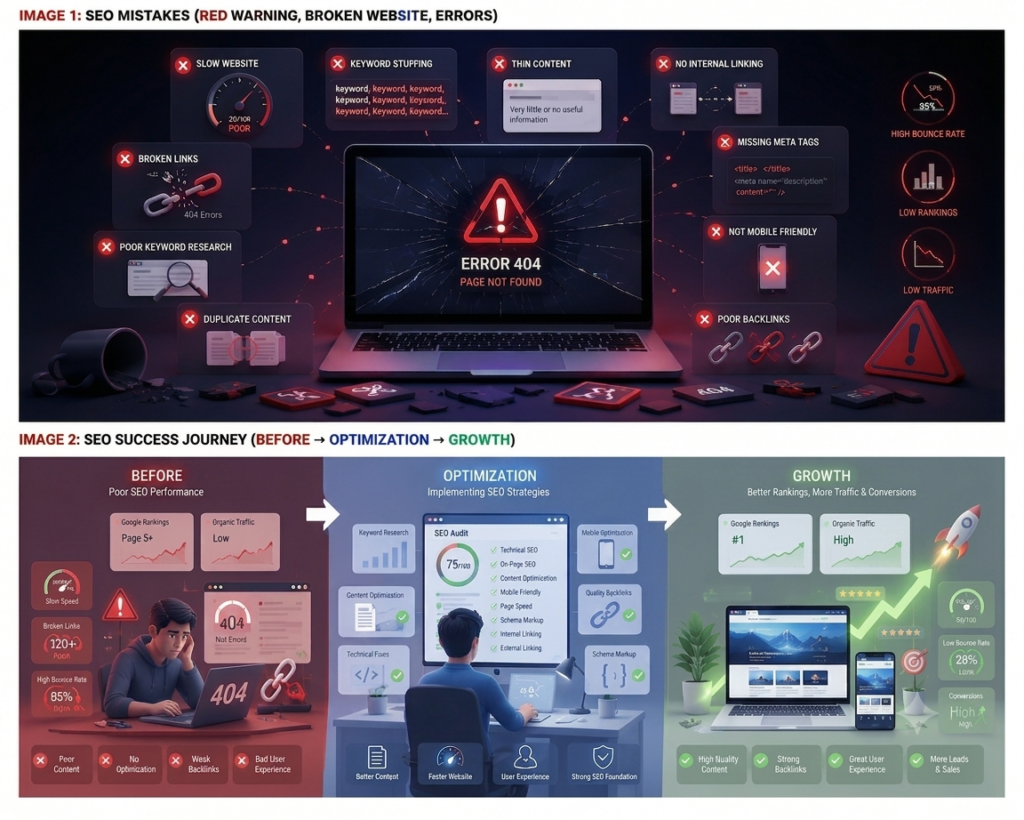
Many websites fail to achieve higher rankings not because they lack content but because they make avoidable SEO mistakes. These mistakes can reduce organic traffic, lower click-through rates, and even prevent pages from being indexed properly.
Whether you’re a blogger, business owner, digital marketer, or SEO beginner, understanding these common SEO issues can help you build a stronger SEO strategy.
In this guide, you’ll discover the 20 most common SEO mistakes in 2026, why they negatively impact your rankings, and practical ways to fix them.
Table of Contents
- Why SEO Mistakes Matter More in 2026
- Ignoring Search Intent
- Poor Keyword Research
- Keyword Stuffing
- Thin Content
- Duplicate Content
- Weak Internal Linking
- Slow Website Speed
- Poor Mobile Experience
- Missing Title Tags & Meta Descriptions
- Not Optimizing Images
- Broken Links
- Ignoring Core Web Vitals
- Low-Quality Backlinks
- Publishing Without Updating Content
- Not Using Schema Markup
- Weak EEAT Signals
- Poor URL Structure
- Ignoring Technical SEO
- Forgetting Local SEO
- Not Tracking SEO Performance
- Final Thoughts
- Frequently Asked Questions (FAQs)
Why SEO Mistakes Matter More in 2026
Google continues to improve its algorithms using artificial intelligence and machine learning. Instead of rewarding websites that simply target keywords, Google now prioritizes websites that provide the best experience for users.
Modern ranking factors include:
- Helpful and original content
- User satisfaction
- Search intent
- Page experience
- Topical authority
- Website trustworthiness
- Content freshness
A single SEO mistake may not drastically affect your rankings, but multiple issues together can significantly reduce your website’s visibility, traffic, and conversions.
1. Ignoring Search Intent
Why It’s a Problem
One of the biggest SEO mistakes is focusing only on keywords and ignoring what users actually want. Search intent means understanding the reason behind a user’s search. Google now ranks content that gives the best answer to the user’s query, not just content with the right keywords.
For example, if someone searches “Best SEO tools,” they expect a comparison of tools with features, pricing, and reviews. A basic article explaining SEO will not satisfy their search intent.
Ignoring search intent can lead to:
- Higher bounce rates
- Lower user engagement
- Fewer conversions
- Lower rankings
- Loss of user trust
Types of Search Intent
- Informational: Users want to learn something.
- Navigational: Users want to visit a specific website.
- Commercial: Users compare products or services before deciding.
- Transactional: Users are ready to buy or take action.
How to Fix It
- Check the top-ranking Google results before writing.
- Understand what users are looking for.
- Create content that matches the search intent.
- Add FAQs, examples, images, and helpful information.
- Update old content if user intent changes.
- Use Google Search Console to find pages with low CTR or poor engagement.
Pro Tip
Always write for users first and search engines second. When your content matches the user’s search intent and provides real value, it has a better chance of ranking higher on Google.
2. Poor Keyword Research
Why It’s a Problem
Keyword research is the foundation of SEO. If you choose the wrong keywords, your content may not reach the right audience or rank on Google. Many beginners focus only on high search volume keywords, but these are often very competitive.
For example, targeting “SEO” is much harder than targeting “SEO Mistakes in 2026,” which is more specific and easier to rank for.
Poor keyword research can lead to:
- Low rankings
- Low organic traffic
- Wrong audience
- Missed ranking opportunities
- Wasted time and effort
How to Fix It
- Use long-tail keywords with lower competition.
- Target question-based keywords that users search for.
- Choose low-competition keywords using SEO tools.
- Create keyword clusters by using related keywords naturally in your content.
Pro Tip
Don’t choose keywords based only on search volume. Focus on keywords with clear search intent, low competition, and high relevance. This helps your content rank better and attract the right audience.
3. Keyword Stuffing
Why It’s a Problem
Keyword stuffing means using the same keyword too many times in your content to try to rank higher in search results. Today, Google focuses on high-quality, natural content, so overusing keywords can hurt your rankings instead of improving them.
Bad Example:
SEO mistakes are the biggest SEO mistakes because SEO mistakes affect SEO rankings.
Better Example:
Common SEO mistakes can reduce your website’s visibility. Improving content quality and fixing technical issues can help increase your Google rankings.
Signs of Keyword Stuffing
- The same keyword appears too often.
- Keywords sound forced.
- Content is difficult to read.
- Headings repeat the same keyword unnecessarily.
How to Fix It
- Use synonyms: SEO errors, SEO issues, optimization mistakes.
- Add related keywords: Technical SEO, keyword research, organic traffic, search rankings.
- Include NLP & semantic terms: Meta title, backlinks, indexing, search intent, Core Web Vitals.
- Write naturally and focus on helping readers.
Best Practices
- Write for users first, search engines second.
- Use your primary keyword naturally.
- Avoid repeating the same keyword in every paragraph.
- Focus on answering the user’s search intent.
Pro Tip
Google rewards valuable, natural, and relevant content. Instead of repeating one keyword, use related terms and write content that is easy to read and helpful for users.
4. Thin Content
Why It’s a Problem
Thin content is content that provides very little useful information or doesn’t fully answer a user’s question. Google now prefers helpful, detailed, and user-focused content, so short articles with limited value often rank lower.
Thin Content Example:
- Covers only a few points.
- Gives little explanation.
- No examples or solutions.
Good Content Example:
- Covers the topic in detail.
- Includes examples, visuals, FAQs, and practical tips.
- Fully answers the user’s search intent.
Signs of Thin Content
- Very little information.
- Important subtopics are missing.
- No examples or visuals.
- Doesn’t answer common user questions.
- Users need to visit other websites for more information.
How to Fix It
- Explain the topic clearly.
- Add real-world examples.
- Include FAQs.
- Use statistics from trusted sources.
- Add images, charts, or screenshots.
- Include practical checklists and expert tips.
Best Practices
- Cover the topic completely.
- Use clear headings and subheadings.
- Add visuals and practical examples.
- Update content regularly.
- Focus on quality rather than word count.
Pro Tip
Don’t write longer content just to increase the word count. Instead, create valuable, in-depth content that fully answers the user’s question. High-quality content is more likely to rank well, earn backlinks, and keep visitors engaged.
5. Duplicate Content
Why It’s a Problem
Duplicate content is content that appears on multiple URLs with the same or very similar text. It can exist within your own website or across different websites. This makes it difficult for Google to decide which page should rank, which can reduce your SEO performance.
Common Examples
- Similar product pages with the same descriptions.
- Category pages using almost identical content.
- Copying content from competitor websites.
- Multiple URLs displaying the same page.
Problems Caused by Duplicate Content
- Confuses search engines.
- Splits ranking signals between pages.
- Causes keyword cannibalization.
- Wastes crawl budget.
- Can lower rankings and organic traffic.
How to Fix It
- Write unique content for every page.
- Use canonical tags to indicate the preferred page.
- Merge similar articles into one detailed guide.
- Create unique meta titles, meta descriptions, and H1 headings.
- Use 301 redirects when removing or combining duplicate pages.
Best Practices
- Publish original content.
- Avoid copying from other websites.
- Write unique product and category descriptions.
- Audit your website regularly for duplicate pages.
- Combine overlapping content instead of creating multiple similar pages.
Pro Tip
Every page should have a unique purpose. Original, high-quality content helps Google understand your website better, improves crawl efficiency, and increases your chances of ranking higher.
6. Weak Internal Linking
Why It’s a Problem
Internal linking means connecting one page of your website to another. It helps users find related content and allows Google to understand your website’s structure. Without proper internal links, important pages may be harder to find and rank.
Why It Hurts SEO
- Google may not crawl or index some pages quickly.
- Users leave your website sooner, increasing bounce rates.
- Link authority isn’t shared across important pages.
- Your website structure becomes harder for search engines to understand.
How to Fix It
- Link to relevant blog posts whenever you mention related topics.
- Add links from blog posts to your service pages.
- Link to category pages to improve site structure.
- Direct related articles to your cornerstone content.
- Use descriptive anchor text instead of “Click Here.”
Best Practices
- Add internal links naturally where they provide value.
- Ensure every important page has internal links.
- Regularly check and fix broken links.
- Update older articles with links to newer content.
Pro Tip
Think of your website as a connected network, not a collection of separate pages. A strong internal linking strategy improves crawling, shares link authority, enhances user experience, and helps your pages rank higher in Google.
7. Slow Website Speed
Why It’s a Problem
Website speed is an important SEO ranking factor. If your website takes too long to load, visitors may leave before viewing your content. A fast website improves user experience, while a slow one can lower rankings, increase bounce rates, and reduce conversions.
Common Causes
- Large, uncompressed images
- Too many plugins or scripts
- Heavy CSS and JavaScript files
- Slow web hosting
- No browser caching or CDN
How to Fix It
- Compress and resize images before uploading.
- Enable browser caching.
- Minify CSS and JavaScript files.
- Use a Content Delivery Network (CDN).
- Upgrade to faster hosting if needed.
- Remove unnecessary plugins and optimize your database.
Best Practices
- Keep page load time under 3 seconds.
- Use tools like Google PageSpeed Insights, GTmetrix, and Lighthouse to test performance.
- Monitor Core Web Vitals in Google Search Console.
- Optimize your website regularly as you add new content.
Pro Tip
Website speed is important for both SEO and user experience. A faster website keeps visitors engaged, improves conversions, helps Google crawl your pages more efficiently, and increases your chances of ranking higher in search results.
8. Poor Mobile Experience
Why It’s a Problem
Google uses mobile-first indexing, which means it primarily evaluates the mobile version of your website for rankings. If your site isn’t mobile-friendly, users may leave quickly, leading to higher bounce rates and lower search rankings.
Common Mobile Issues
- Text that is too small to read.
- Buttons or links placed too close together.
- Horizontal scrolling.
- Slow loading pages.
- Complicated navigation or difficult-to-use menus.
How to Fix It
- Use a responsive design that works on all screen sizes.
- Choose readable font sizes and proper spacing.
- Make buttons and links easy to tap.
- Improve mobile speed by compressing images, enabling caching, and minimizing CSS and JavaScript.
- Test your website on different devices and browsers.
Best Practices
- Follow a mobile-first design approach.
- Ensure content is readable without zooming.
- Avoid horizontal scrolling.
- Keep navigation simple and user-friendly.
- Monitor mobile usability and Core Web Vitals regularly.
Pro Tip
A fast, responsive, and easy-to-use mobile website improves user experience, increases engagement, and helps your pages rank higher in Google search results.
9. Missing Title Tags & Meta Descriptions
Why It’s a Problem
Title tags and meta descriptions are the first things users see in Google search results. They help search engines understand your page and encourage users to click. Missing, duplicate, or poorly written metadata can reduce your click-through rate (CTR) and overall SEO performance.
Common Issues
- Missing title tags or meta descriptions.
- Duplicate metadata on multiple pages.
- Titles that are too long or too short.
- Missing target keywords.
- Generic titles like “Home” or “Blog.”
How to Fix It
- Write a unique title tag (55–60 characters) for every page.
- Create a compelling meta description (150–160 characters).
- Include your primary keyword naturally.
- Clearly describe the page’s content and encourage users to click.
- Ensure every page has a unique title, meta description, and H1 heading.
Best Practices
- Keep titles and descriptions within the recommended length.
- Avoid keyword stuffing.
- Make every page’s metadata unique.
- Review and update metadata regularly to improve CTR.
Pro Tip
Think of your title tag and meta description as your advertisement in Google search results. A clear, keyword-rich title and an engaging description can increase clicks, drive more organic traffic, and improve your overall SEO performance.
10. Not Optimizing Images
Why It’s a Problem
Images improve user experience, but unoptimized images can slow down your website and hurt SEO. Proper image optimization helps improve page speed, accessibility, and search rankings, while also increasing the chances of appearing in Google Images.
Common Mistakes
- Uploading large image files.
- Missing ALT text.
- Using generic file names like IMG12345.jpg.
- Choosing the wrong image format.
- Not using responsive images or lazy loading.
How to Fix It
- Compress images before uploading.
- Use descriptive file names (e.g., seo-mistakes-2026.jpg).
- Add meaningful ALT text for every important image.
- Use the right format (WebP, JPEG, PNG, or SVG).
- Enable lazy loading and use responsive images.
Best Practices
- Keep image file sizes small.
- Write clear ALT text without keyword stuffing.
- Use modern formats like WebP whenever possible.
- Optimize images for mobile devices.
- Add captions where they provide value.
Pro Tip
Every image should improve both user experience and SEO. Optimized images load faster, improve accessibility, boost page speed, and increase your chances of ranking in Google Search and Google Images.
11. Broken Links
Why It’s a Problem
Broken links are links that lead to a 404 Page Not Found error because the page has been deleted, moved, or the URL is incorrect. They create a poor user experience and make it harder for search engines to crawl your website.
Why It Hurts SEO
- Poor user experience.
- Wastes Google’s crawl budget.
- Reduces link equity.
- Can negatively affect search rankings.
How to Fix It
- Audit your website regularly to find broken links.
- Replace outdated links with the correct URLs.
- Use 301 redirects when pages are moved.
- Remove links that no longer have a relevant destination.
- Create a helpful custom 404 page with links to important pages.
Best Practices
- Check internal and external links regularly.
- Set up redirects before deleting or moving pages.
- Test links after website updates or migrations.
- Monitor broken links using SEO tools.
Useful Tools
- Google Search Console
- Screaming Frog SEO Spider
- Ahrefs Site Audit
- Semrush Site Audit
- Broken Link Checker
Pro Tip
Regularly fixing broken links improves user experience, crawl efficiency, and SEO performance. A well-maintained website helps search engines crawl your content more effectively and keeps visitors engaged.
12. Ignoring Core Web Vitals
Why It’s a Problem
Core Web Vitals are Google’s page experience metrics that measure how fast, responsive, and visually stable your website is. Poor Core Web Vitals can lead to lower rankings, higher bounce rates, and a poor user experience.
The Three Core Web Vitals
- Largest Contentful Paint (LCP): Measures how quickly the main content loads. Good: Under 2.5 seconds.
- Interaction to Next Paint (INP): Measures how quickly the page responds to user interactions. Good: Under 200 ms.
- Cumulative Layout Shift (CLS): Measures visual stability while the page loads. Good: Less than 0.1.
How to Fix It
- Compress and optimize images.
- Minify CSS and JavaScript files.
- Enable browser caching.
- Use a Content Delivery Network (CDN).
- Reduce unnecessary plugins and third-party scripts.
- Reserve space for images and ads to prevent layout shifts.
Best Practices
- Optimize images before uploading.
- Improve server response time.
- Use lazy loading for images.
- Monitor Core Web Vitals regularly.
- Test both desktop and mobile performance.
Useful Tools
- Google PageSpeed Insights
- Google Search Console
- Google Lighthouse
- GTmetrix
- Chrome DevTools
Pro Tip
Improving LCP, INP, and CLS creates a faster, smoother, and more stable website. This enhances user experience, increases engagement, and helps improve your SEO performance.
13. Low-Quality Backlinks
Why It’s a Problem
Backlinks are links from other websites to your website. High-quality backlinks improve your website’s authority, while spammy or low-quality backlinks can harm your SEO and lead to lower rankings or even Google penalties.
Common Low-Quality Backlinks
- Spammy blog comments
- Link farms and PBNs
- Automated backlinks
- Irrelevant directory submissions
- Paid links that violate Google’s guidelines
How to Fix It
- Write guest posts on reputable websites.
- Earn backlinks through Digital PR and original research.
- Get featured on relevant resource pages.
- Create high-quality content such as guides, case studies, infographics, and free tools that naturally attract backlinks.
Best Practices
- Focus on quality over quantity.
- Build backlinks from relevant and trusted websites.
- Use natural anchor text.
- Monitor your backlink profile regularly.
- Remove or disavow harmful backlinks when necessary.
Pro Tip
A single backlink from a trusted, relevant website is often more valuable than hundreds of low-quality links. Focus on creating valuable content that naturally earns backlinks and strengthens your website’s authority over time.
14. Publishing Without Updating
Why It’s a Problem
Publishing content without updating it can hurt your SEO over time. Google prefers fresh, accurate, and relevant content, especially for topics like SEO, technology, and digital marketing. Outdated articles may lose rankings and organic traffic.
How Outdated Content Hurts SEO
- Lower search rankings.
- Reduced organic traffic.
- Loss of user trust.
- Lower engagement and fewer backlinks.
How to Fix It
- Update old statistics with the latest data.
- Add new sections, trends, and FAQs.
- Replace outdated screenshots and examples.
- Fix broken links and outdated references.
- Refresh your meta title and meta description with current keywords.
Best Practices
- Review important content every 6–12 months.
- Keep statistics and visuals up to date.
- Improve readability and formatting.
- Re-optimize content for current search intent.
- Update internal and external links regularly.
Pro Tip
Updating existing content is often more effective than creating new articles. Fresh, relevant content improves rankings, increases organic traffic, builds user trust, and helps your website stay competitive in search results.
15. Not Using Schema Markup
Why It’s a Problem
Schema Markup (structured data) helps search engines better understand your website’s content. While it doesn’t directly improve rankings, it can make your pages eligible for rich results, which can increase visibility and improve click-through rates (CTR).
Common Types of Schema
- Article Schema – For blog posts and news articles.
- FAQ Schema – For frequently asked questions.
- How-To Schema – For step-by-step guides.
- Product Schema – For eCommerce products.
- Organization Schema – For business information.
How to Fix It
- Add schema using JSON-LD (Google’s recommended format).
- Use SEO plugins like Rank Math or Yoast SEO.
- Choose the correct schema type for each page.
- Test your structured data using Google’s validation tools.
Best Practices
- Match schema with the page content.
- Keep structured data updated.
- Validate schema before publishing.
- Use JSON-LD whenever possible.
- Combine schema with high-quality content and technical SEO.
Pro Tip
Schema Markup helps Google understand your content and display it more effectively in search results. Rich results can improve your website’s visibility, attract more clicks, and enhance your overall SEO performance.
16. Weak E-E-A-T Signals
Why It’s a Problem
E-E-A-T stands for Experience, Expertise, Authoritativeness, and Trustworthiness. These signals help Google evaluate whether your content is reliable and trustworthy. Websites with strong E-E-A-T are more likely to rank well, especially for topics related to health, finance, and other YMYL (Your Money or Your Life) content.
How to Improve E-E-A-T
- Add author bios with relevant experience and qualifications.
- Cite information from trusted sources.
- Share real experiences, case studies, and practical examples.
- Include important pages like About Us, Contact Us, and Privacy Policy.
- Keep content accurate and updated.
- Build authority by earning quality backlinks and publishing valuable content.
Best Practices
- Clearly identify the author of each article.
- Support claims with reliable sources.
- Regularly update outdated content.
- Secure your website with HTTPS.
- Focus on helping users with accurate and trustworthy information.
Pro Tip
Strong E-E-A-T builds user trust and improves your website’s credibility. By sharing genuine experience, maintaining accurate content, and demonstrating expertise, you increase your chances of achieving long-term SEO success.
17. Poor URL Structure
Why It’s a Problem
A URL is the web address of a page. A clean, descriptive URL helps both users and search engines understand what the page is about. Long or confusing URLs with random numbers and symbols can reduce readability and SEO performance.
Bad URL:
website.com/page?id=12345
Good URL:
website.com/seo-mistakes-2026
Common URL Mistakes
- Using random numbers or unnecessary parameters.
- Creating very long URLs.
- Using uppercase letters or underscores.
- Repeating keywords unnecessarily.
How to Fix It
- Use short, descriptive URLs.
- Include your primary keyword naturally.
- Separate words with hyphens (-).
- Remove unnecessary words.
- Use 301 redirects if you change an existing URL.
Best Practices
- Keep URLs simple and relevant.
- Use lowercase letters only.
- Avoid unnecessary symbols and numbers.
- Maintain a consistent URL structure across your website.
Pro Tip
A short, keyword-rich URL is easier to read, share, and understand. While it won’t boost rankings on its own, it improves user experience and supports a stronger on-page SEO strategy.
18. Ignoring Technical SEO
Why It’s a Problem
Technical SEO helps search engines crawl, index, and understand your website. Even with great content, technical issues can prevent your pages from ranking, leading to lower visibility and organic traffic.
Common Technical SEO Issues
- Crawl errors (404 and server errors)
- Indexing problems
- Missing or outdated XML sitemap
- Incorrect robots.txt settings
- Redirect chains
- Slow page speed and poor Core Web Vitals
How to Fix It
- Fix crawl errors and broken links.
- Ensure important pages are indexed.
- Keep your XML sitemap updated and submit it to Google Search Console.
- Review your robots.txt file regularly.
- Remove unnecessary redirect chains.
- Improve page speed and Core Web Vitals.
- Perform regular technical SEO audits.
Useful Tools
- Google Search Console
- Google PageSpeed Insights
- Screaming Frog SEO Spider
- Ahrefs Site Audit
- Semrush Site Audit
- Google Lighthouse
Best Practices
- Monitor technical issues regularly.
- Keep your sitemap and robots.txt updated.
- Fix broken links and crawl errors promptly.
- Ensure all important pages are crawlable and indexable.
Pro Tip
Technical SEO is the foundation of a successful website. Regular audits help identify hidden issues, improve crawlability, enhance user experience, and keep your website optimized for better search rankings.
19. Forgetting Local SEO
Why It’s a Problem
Local SEO helps your business appear in location-based searches such as “SEO company near me” or “Digital Marketing Agency in Vadodara.” Without Local SEO, you may miss customers searching for your products or services nearby.
How to Fix It
- Optimize your Google Business Profile with accurate business details.
- Keep your NAP (Name, Address, Phone Number) consistent across all platforms.
- Encourage customers to leave genuine reviews.
- Create unique location-specific pages for each service area.
- Build local citations on trusted business directories.
- Use local keywords naturally in your content, titles, and meta descriptions.
Best Practices
- Keep your Google Business Profile updated.
- Respond to customer reviews professionally.
- Use consistent business information everywhere online.
- Add location-specific content instead of duplicate pages.
- Update your business details and photos regularly.
Pro Tip
A strong Local SEO strategy helps your business rank higher in Google Maps and local search results. By optimizing your online presence and maintaining accurate business information, you can attract more nearby customers, increase trust, and generate more leads.
20. Not Tracking SEO Performance
Why It’s a Problem
SEO is an ongoing process, not a one-time task. If you don’t track your SEO performance, you won’t know whether your efforts are improving your website or where changes are needed. Regular monitoring helps you identify issues, measure progress, and make data-driven decisions to improve your rankings.
Tools to Track SEO Performance
- Google Search Console (GSC): Tracks search performance, clicks, impressions, keyword rankings, indexing status, and crawl errors.
- Google Analytics 4 (GA4): Monitors organic traffic, user behavior, engagement, and conversions.
- Ahrefs: Helps track backlinks, keyword rankings, competitor analysis, and website authority.
- Semrush: Provides keyword tracking, site audits, backlink monitoring, and technical SEO insights.
Important SEO Metrics to Track
- Organic Traffic: Measures visitors coming from search engines.
- Click-Through Rate (CTR): Shows how often users click your page after seeing it in search results.
- Keyword Rankings: Tracks the position of your target keywords on Google.
- Conversions: Measures actions like form submissions, purchases, or newsletter sign-ups.
- Bounce Rate: Indicates how many users leave your site without interacting further.
Best Practices
- Review Google Search Console and GA4 reports regularly.
- Track keyword rankings and organic traffic every month.
- Monitor backlinks using Ahrefs or Semrush.
- Set up conversion tracking to measure SEO ROI.
- Compare current performance with previous months to identify growth opportunities.
Pro Tip
The best SEO strategies are based on data, not assumptions. By regularly tracking key metrics and using the right SEO tools, you can identify what’s working, fix issues early, improve your rankings, and achieve long-term organic growth.
Conclusion
SEO in 2026 is no longer about shortcuts or tricks. Success comes from understanding user intent, creating genuinely helpful content, maintaining a technically healthy website, and continuously improving the user experience.
By avoiding the common SEO mistakes covered in this guide—such as poor keyword research, keyword stuffing, slow page speed, weak internal linking, duplicate content, and neglecting EEAT—you can build a stronger online presence and achieve more sustainable rankings.
Treat SEO as an ongoing process rather than a one-time task. Regular audits, content updates, and performance tracking will help your website stay competitive as search engines continue to evolve.
Frequently Asked Questions (FAQs)
What is the biggest SEO mistake in 2026?
Ignoring search intent and creating content that doesn’t fully answer users’ questions is one of the biggest SEO mistakes in 2026.
Does keyword stuffing still hurt SEO?
Yes. Google can detect unnatural keyword usage, and it may negatively affect rankings.
How often should I update my content?
Review important pages every 6–12 months, or sooner if there are major industry changes.
Is technical SEO still important?
Absolutely. A technically sound website helps search engines crawl, index, and rank your content more effectively.
Which tools help identify SEO mistakes?
Google Search Console, Google Analytics 4, Ahrefs, Semrush, Screaming Frog, and PageSpeed Insights are widely used to detect and fix SEO issues.